Automation
AI
Digital Presence Opimization
Building an Automated Market Intelligence Engine to Optimize the Digital Presence (Using Make, Apify, and Gemini)
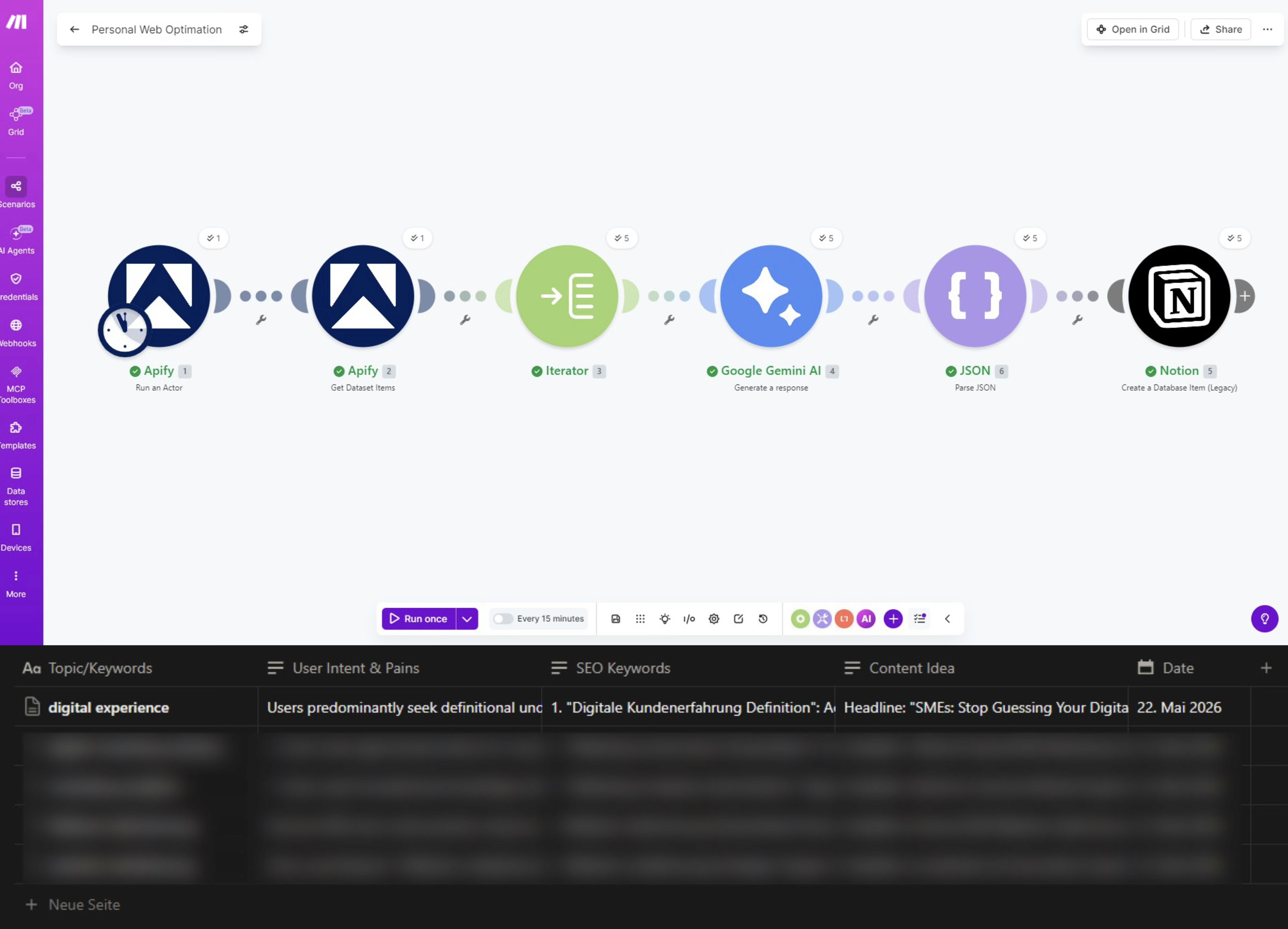
Discover how to bridge the gap between frontend website content and backend workflow automation. A technical deep dive into using Make.com, Apify, and Gemini to automate user intent analysis and website localization strategies for local markets.
When scaling your digital presence into a new local market, success demands a delicate balance. To build real organic traction, businesses often face a gap between their frontend marketing strategy and their backend workflow.
Many companies treat website and brand localization as a simple translation task. However, true website optimization is about aligning your entire digital infrastructure with the real-time needs, user intent, and interests of the local audience.
To bridge this gap, I built an automated market research and anlysis loop on Make.com. In this post, I will take you behind the scenes and break down the exact technical setup.
The Challenge: Understanding User Intent & Market Demand
Continuous Marketing Data Analysis is essential for a successful Multilingual SEO strategy. However, the traditional process of truly understanding what your audience cares about is deeply fragmented. Typically, a marketer need to:
Manually scrape localized search engine results (such as Google or Baidu) for target markets.
Sift through endless "People Also Ask" (PAA) sections and related queries to map out user pain points.
Manually cross-reference those insights against existing website copy to find content gaps.
This manual loop creates an operational bottleneck: Instead of executing strategic optimization, teams spend hours on repetitive data collection. To turn this into a structured, repeatable engine, I connected Apify, Gemini AI, and Notion using Make.com.
Here is exactly how the technical architecture works.
Technical Deep Dive: The 3-Step Automation Setup
![The 3-Step Automation Setup: [Apify Search Scraper] ➔ [Make.com Iterator] ➔ [Gemini AI Analysis (JSON Parsing)] ➔ [Notion-Datenbank]](https://framerusercontent.com/images/tFkgDF1ZR9kIXrnx0aiJxwr510.png)
Step 1: Automated Market Intent Retrieval via Apify
The workflow begins by analyzing real-time local user behavior. I configure an Apify actor to scrape Google Search results for my specific target niches within the local market.
Unlike basic keyword tools that only show search volume, this scraper captures the full anatomy of local search intent, including:
Organic Results: What types of solutions are currently ranking at the top?
Related Queries: What else are users searching for in the same context?
People Also Ask (PAA): The exact questions local users are typing into Google.
This provides the raw, unedited market intelligence directly from Google.
Step 2: Handling the Data Flood with Make.com Iterators
Apify outputs a rich, bundled dataset containing arrays of nested information (dozens of PAA questions and related queries). If you feed this raw bundle straight to an AI module, the analysis becomes cluttered, expensive, and vague.
To solve this, I implemented a Iterator.
Why the Iterator is critical: The Iterator takes the single raw data bundle from Apify and splits it into individual, separate bundles for each query, organic result, and PAA question. This ensures that every single piece of user interest data can be processed line-by-line in the subsequent steps, preventing any critical local pain points from being overlooked.
Step 3: AI-Driven Gap Analysis & Advanced JSON Parsing
Next, the structured individual bundles are passed to a custom Gemini AI module. The AI acts as the analytical brain, cross-referencing the live local search intent against my current live website content.
To make the AI output actionable for automation, I instructed Gemini to output its response using strict JSON Formatting.
The Power of Parsing JSON: Raw AI text outputs are incredibly messy for databases. By forcing the AI to respond in JSON format, Make.com can reliably parse the text into clean, predictable data fields.
This JSON parsing allows the workflow to instantly separate the analysis into three distinct columns and map them straight into a Notion database:
User Intent & Pains: A clear breakdown of the local user's frustrations and motivations.
SEO Keyword Recommendations: High-potential local search terms to target.
Tailored Content Ideation: Content outlines and headlines generated to fill the content gap.
Keeping the Human in the Loop
While this Automated Digital Presence Opimization Workflow saves hours of manual heavy lifting, it is not a "set-and-forget" replacement for human expertise.
Automations can encounter API errors, and AI models lack the ultimate strategic nuance required for complex B2B markets. In my system, the automation handles 90% of the research, data gathering, and structuring. However, the final strategic decisions, content polishing, and brand voice alignment always require human oversight.
Bridging the Operational Gap for High-Impact Decisions
The true value of this automation isn't just about replacing human effort—it's about reallocating it.
When your front-end website content and your back-end workflows are in sync, you eliminate the tedious manual busywork. By automating the Marketing Analytics loops, you give your team the gift of clean, structured data on a silver platter.
Instead of spending days sorting through spreadsheets, you can immediately focus on what matters most: making higher-impact, data-driven decisions to continuously optimize your digital presence and capture market share.
How is your team currently bridging the gap between marketing strategy and process automation? If you are looking to optimize your digital presence for European or Asian markets or automate your marketing operations, let’s connect and exchange insights!